AFRICA · SOUTH AFRICA GUIDE
South Africa Travel Essentials: SIMs, Plugs & Packing
South Africa travel preparation works best when it follows the route. A city stay, a self-drive coast journey and a safari need different clothing, communications and arrival arrangements. Handle the essentials before departure, then keep the everyday kit small enough to use comfortably. This page brings the practical checks together; detailed entry, health, transport and money decisions have their own guides.
Documents and an offline trip file
Keep the passport, applicable visa or permission, first accommodation address and onward arrangements accessible. Save the travel insurance contact, transport confirmations and copies of important documents in a secure place that does not depend entirely on one phone. Carry the documents the responsible authority requires in the original form where necessary.
Use Visa & Entry for nationality-specific checks. Customs is separate: the SARS online Traveller Declaration is required before entering or leaving South Africa, subject to limited exceptions. Save its confirmation alongside the booking information instead of leaving it only in an email that needs a live connection.
For a rental car, bring the agreed licence documents and the payment card accepted for the deposit. For a regional flight, save baggage conditions and the exact collection instructions. A compact note with the day's address and contact number is easier to use on arrival than searching through weeks of messages.
Pack for more than one climate
Build a layered clothing system: comfortable daytime clothing, a warm mid-layer, wind protection and an appropriate rain layer. Add footwear suited to the actual walks you intend to do. Beach sandals and city trainers do not replace suitable footwear for a rocky trail, while heavy hiking boots may be unnecessary for a city-and-lodge trip.
For safari, think about the early drive rather than only the afternoon temperature. Keep the warm layer accessible without unpacking the whole case. A hat, sun protection and a refillable bottle are useful across many routes, but ask each property about safe drinking-water refills.
Bring prescription medication in labelled packaging with supporting information, and plan enough for plausible delays. Consult a clinician about route-specific health needs before travel. Do not copy another traveller's medication list or assume a malaria recommendation applies equally to every region. See Health, Safety & Useful Contacts.
Plugs, charging and backup power
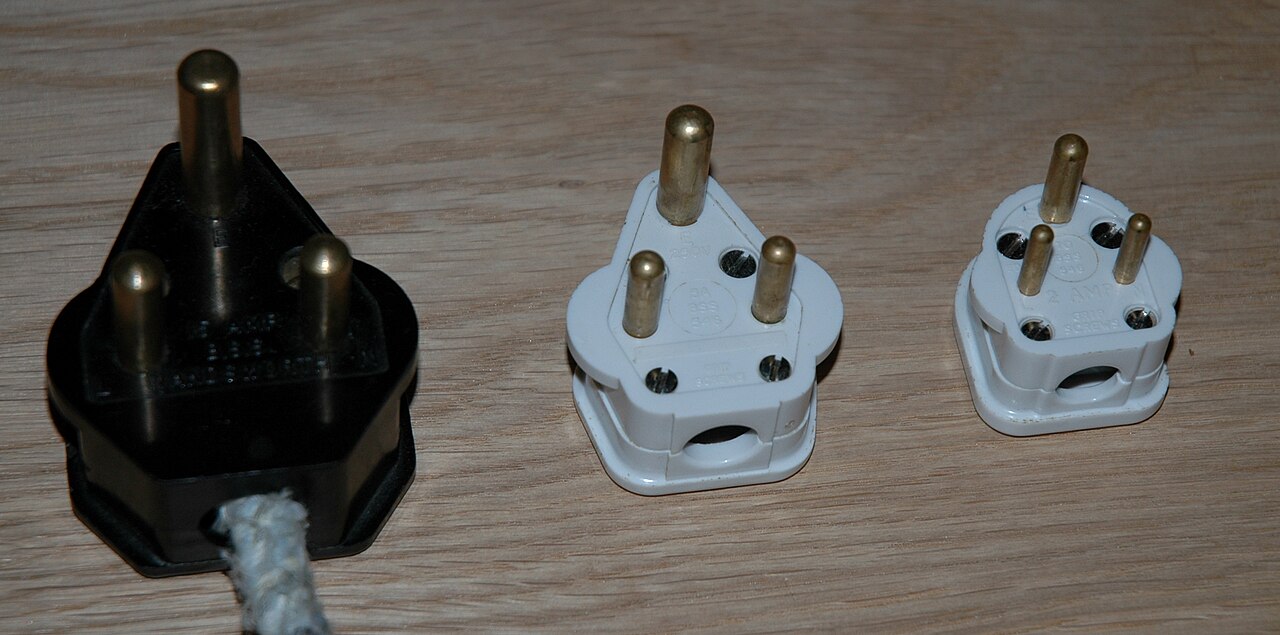
Check that your adapter is made for South African sockets. Large round-pin Type M outlets remain relevant, while newer Type N configurations also occur. A product called a universal adapter may not include the configuration you need. Ask the property which outlets are available and compare that answer with the adapter's actual pins.
The South African Bureau of Standards describes the coexistence of socket configurations and cautions about adapters. Use an appropriate approved product, avoid stacking adapters and do not force a plug into an unsuitable socket. An adapter changes the connection shape; it does not necessarily convert voltage. Check the input rating on each appliance, especially heat-producing equipment.
Carry the charging cables your own devices need and a power bank appropriate for the airline's rules. Ask what the accommodation's backup system powers. A working router does not establish that every room socket, lift or refrigerator remains available. For medical equipment, obtain a specific plan directly from the property and relevant professional advisers.
SIM cards, eSIMs and RICA
Compare home-network roaming, a South African prepaid SIM and a travel eSIM by the services you need, not just advertised gigabytes. Check device compatibility and whether the phone is unlocked before buying. Keep access to the home number if you need bank verification texts or other authentication messages.
Vodacom's published Travel SIM terms describe tourist bundles with data, airtime, calls and SMS. Its eSIM page requires RICA registration and notes that devices obtained outside South Africa can face compatibility restrictions. Confirm the current product, identification documents and activation steps with the provider.
A local number can help when calling accommodation, transport or a business. A data-only eSIM may support internet messaging but does not automatically provide ordinary voice calls or SMS. Establish how you can make urgent calls and reach local contacts before heading into a remote area. Coverage, voice capability and having sufficient data are three separate questions.
Check whether the bundle includes anytime data, whether part of the advertised allocation is restricted to particular hours, its expiry date and the cost of topping up. A plan valid in South Africa may not roam into a neighbouring country. Read the border-country coverage separately if the route includes another destination.
Useful apps and offline backups
On a small screen, scroll the table sideways to compare all columns.
| Task | Useful tool | Offline backup |
|---|---|---|
| Navigation | A map app with downloaded areas and host-confirmed routes | Written approach instructions and the property number |
| City journeys | Gautrain or MyCiTi operator planning information | Stop, route and last-service details saved before leaving |
| Weather | South African Weather Service forecasts and warnings | A flexible alternative activity and sufficient clothing |
| Bookings | Airline, accommodation or transport provider confirmation | Reference, address and meeting point saved locally |
Use the South African Weather Service for forecasts and warnings. For urban transport, consult Gautrain or MyCiTi for the actual route. General map apps are helpful, but do not override a closure, operator notice or current advice from your host.
Download the region before leaving reliable Wi-Fi. Save the destination's entrance instructions and enough information to navigate a phone failure. Keep a charging option accessible in the vehicle if supplied and safe to use. Avoid turning arrival into a search for an app you have never opened before.
Accessibility: ask for the details you need
Describe functional requirements to the provider: step-free access, doorway width, bathroom layout, transfer assistance, seating or space for equipment. “Accessible” can mean different things in different listings. Request recent photographs and measurements of the actual unit, vehicle and route, rather than relying on a general property label.
SANParks provides disability and mobility-access information and explains that adapted units need appropriate booking arrangements. Confirm the exact accommodation and activity independently. A ramp to reception does not establish access to a game-drive vehicle, a trail or a particular bathroom.
For flights, notify the airline of equipment and assistance needs in advance, then reconfirm the arrangement. Ask a transfer provider whether you can remain seated in a wheelchair or whether a transfer into the vehicle is required. If your needs depend on an operating lift or electricity, ask about the specific backup arrangement and an alternative.
Money, water and the daily routine
Keep a manageable cash reserve and a separate payment backup. Confirm deposit rules before arriving to collect a car or check into accommodation. The Money & Payments guide covers conversion offers, card holds and cash planning.
Ask about local drinking-water conditions and follow notices where supply has been interrupted. Pack a small day bag with the essentials you can realistically carry: water, sun protection, weather layer, medication, phone and necessary documents. Leave unnecessary valuables secured instead of carrying every item to every stop.
On the first evening at a new base, check the next day's transport and the return plan. Ask where to wait for a ride and whether any local conditions affect the route. Small practical checks are easier to handle before leaving than in a busy pickup area after dark.
Travel Essentials FAQ
Will my universal adapter work?
Check its actual South African plug compatibility. Type M and newer Type N arrangements both matter; ask the accommodation and inspect the adapter rather than relying on the word “universal”.
Is a data-only eSIM enough?
It can handle internet messaging and maps where coverage exists, but it may not provide ordinary calls or SMS. Confirm a separate way to make urgent voice calls and contact local providers.
Do I need to complete the Traveller Declaration if I have nothing to declare?
The online SARS requirement includes a NIL declaration route. Follow the current official process and save the confirmation; it is separate from your visa status.
How do I check whether a safari stay is accessible?
Request details for the exact unit, bathroom, vehicle and activity. Ask about measurements, transfers, equipment space and backup arrangements rather than relying on a single accessibility label.